
Your AI, your workflow.
Your own assistant, built from your answers to the setup questions and set up with you. Never a template.
Your assistant in a Claude Project
- Writes emails, follow-ups, posts and updates in your voice
- Works with a free Claude account
- Works on your phone
The full folder system, installed with you
- Everything in Lite, plus memory
- Reads and saves files, so it keeps your contacts, dates and follow-ups up to date
- Runs in Claude Code on your computer and needs a paid Claude plan
Onboarded like a new hire.
Your first AI staff member gets what any new hire needs: a role, a clear goal, a way to tell the job was done right, the background, and a great example to match. It helps you and your people. It never replaces them.
A day with your assistant.
Today's follow-ups
Ask who to follow up with. Your Pro kit reads your contacts and lists them, with a draft for each.
Customer replies
A customer email comes in. Type the gist and get a reply in your voice, checked. You send it.
Posts and updates
Turn a few notes into this week's post or update, written the way you write.
A new rule
Add a new rule once. Your assistant uses it from then on.
Every draft passes a check before you see it.
Here's what happens between your request and the draft on your screen.
The "start on the fast setting, step up only when the check fails" rule is an idea from Kem at Glitch Cat Club.
Built in layers, like folders on a desk.
Each folder holds one piece of what your business knows or does. Stacked together, they become an assistant that works the way you work.
The method is my way of teaching the ICM folder system created by Jake Van Clief. Everything is plain files: you can open, change and back up every one.
Every file has one job.
This is the Pro kit for a real estate agent. Each folder holds one kind of thing, and you can open any of them.
Read every time
Your records
What you know
Coming in
At a glance
Already have years of documents? AI-Ready Files sorts them into this structure for you.
Built for the way agents work.
The Real Estate AI Kit writes listings, follow-ups, posts and seller updates, with fair housing and privacy checks built in. Pro adds buyer pages, deadlines and a daily follow-up list.
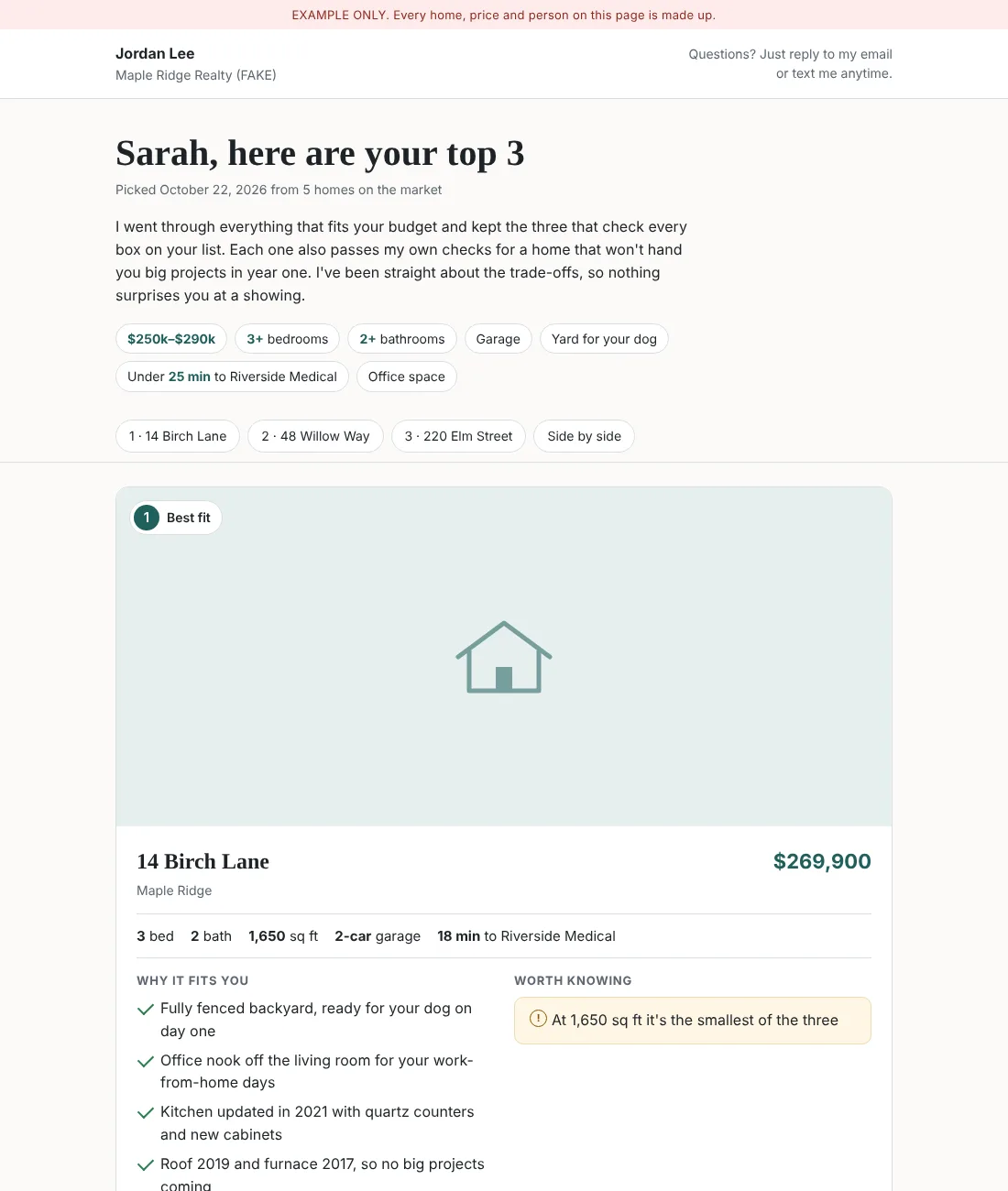
- Listings in your voiceFrom the facts you give it, checked for fair housing language.
- A buyer's top 3Matches homes to a buyer's list and makes a page you can send.
- Who to follow up with todayFrom new leads to past clients (Pro).
- Every deadline on every dealDates under contract, tracked in your folder (Pro).
- Homes, never peopleIt describes the house, not who should live there.
Not an agent? The same kit is set up for service shops and offices with writing to do: quotes, payment reminders, scheduling and review requests.
Nothing goes out without your yes.
It drafts, you decide
You approve every message before it is sent.
Checks on every draft
Your own checks and your industry rules run first.
Designed so I never see your data
Checkup reports show file names and counts only.
Plain files you own
A folder you can open, change and back up. No black box.
It grows with your business.
Your files are the roots and your folders are the trunk. Setup gives it your voice and your clients. The "train it" round, part of 90 Days Together, sharpens your jobs and your "done right" checks. Kit Care brings the quarterly upgrade, plus a model checkup when a newer Claude model replaces the one your kit runs on.
One price, in writing, before we start.
$749
- 2 hours together, one-on-one, on your own computer
- A 1-hour lesson, then we set up your kit
- A cheat sheet to keep
$99/month
- Optional, after your setup
- Fix packs by email when something breaks
- The quarterly upgrade pack
- A model checkup when a newer Claude model replaces the one your kit runs on
$199/month
- Everything in Kit Care
- A monthly checkup and review
- A fix pack when the checkup finds something
Care plans are month to month; cancel before the next billing date. Extra help is $150 an hour, 1-hour minimum. Your Claude plan is separate and paid to Anthropic. A 50% deposit holds your date. Cancel 30 or more days before and it's refunded in full; cancel later and the deposit is kept. If I ever cancel, you get back everything you paid. The rest is due on the day, before we start. Cash, check, Venmo or Zelle.
Training a whole office? See team training.
Questions about the kit
What's the difference between Lite and Pro?
Lite writes for you. Pro also remembers for you: it reads and saves files, so it keeps your contacts, dates and follow-ups up to date.
What AI does my kit use?
Claude, made by Anthropic. Lite runs in a Claude Project and works with a free Claude account. Pro runs in Claude Code on your computer and needs a paid Claude plan.
Do you see my data?
The kit is designed so I never see your data. Your files stay in a folder you own. Checkup reports show file names and counts only.
What do I need ready for setup day?
Your computer and your answers to the setup questions. We can go through the questions together live, or I email you a questionnaire.
What if something breaks later?
Kit Care ($99/month) sends fix packs by email and includes the quarterly upgrade. Without a care plan, extra help is $150 an hour, 1-hour minimum.
Where does the new-hire idea come from?
The idea of managing AI like a new hire comes from Nick Saraev's role engineering video.
What if I need to cancel?
A 50% deposit holds your date. Cancel 30 or more days before and it's refunded in full; cancel later and the deposit is kept. If I ever cancel, you get back everything you paid.
Let's talk for 15 minutes.
Call, text or email me, and we'll see what fits how you work. There's no charge for the call.